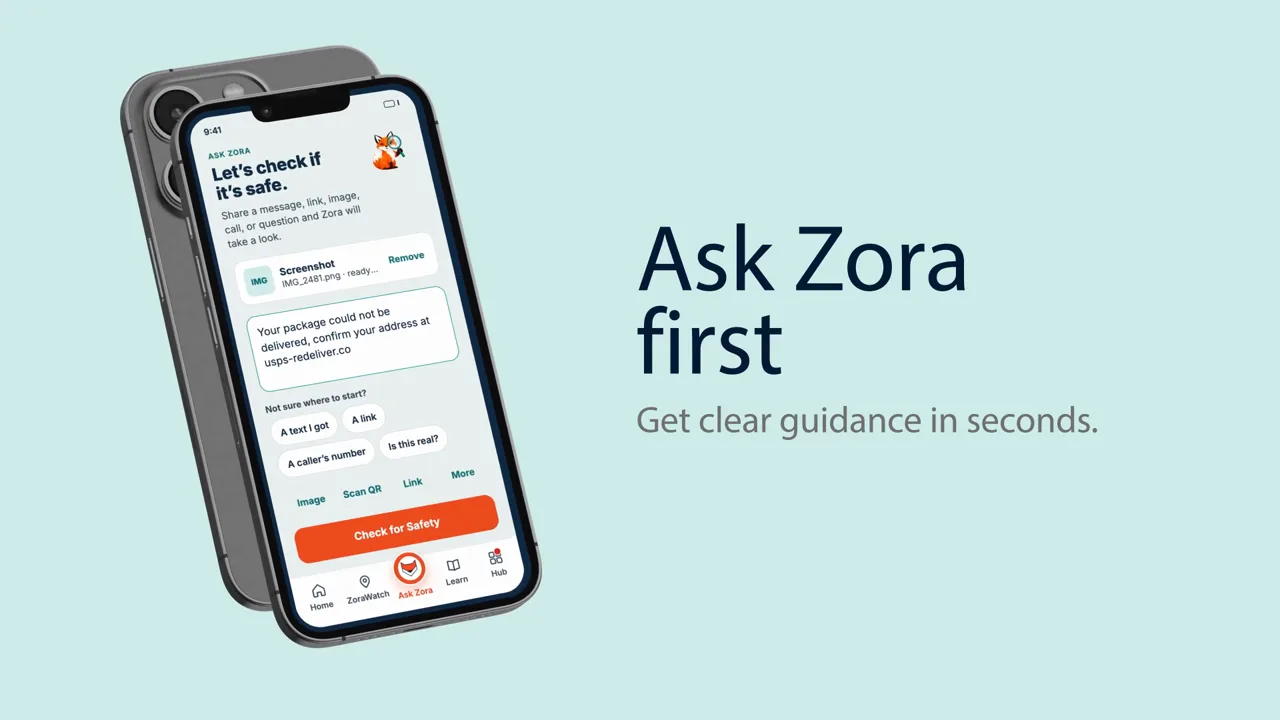
Digital Safety, Simplified.

    Know if it’s a scam before you respond.

    ZoraSafe helps people check suspicious calls, texts, links, emails, images, websites, QR codes, and urgent requests. It explains what may be risky and gives practical next steps.

    Available on iPhone today for individuals, families, older adults, and trusted supporters.

    A real ZoraSafe check with a plain-language warning and next steps.

    What ZoraSafe helps you do

    01

    Check something suspicious

    Send or scan a questionable text, email, link, image, phone number, or QR code.

    02

    Understand the risk

    Zora explains what looks suspicious and why in plain language instead of security jargon.

    03

    Know what to do next

    Get clear steps to pause, verify, block, report, or recover.

    04

    Protect people you trust

    Share important warnings with trusted family members without turning family protection into surveillance.

    When something does not feel right

    Start with the message, call, link, or code in front of you. ZoraSafe helps you slow down and decide what to do next.

    A bank text demands an immediate click

    A message says your account will close unless you act now.

    Send the text or link to ZoraSafe to understand the warning signs and get safe verification steps.

    A caller says a grandchild needs money

    Someone claims a loved one is in trouble and pressures you to pay quickly.

    Check the phone number or describe the situation to Zora for guidance before sending money.

    A delivery or refund message looks off

    An email or text promises a refund or asks for a small delivery fee.

    Ask ZoraSafe to review the message, screenshot, or destination link and explain what looks suspicious.

    A QR code opens a payment or login page

    A code in public or in a message leads somewhere you did not expect.

    Scan the QR code with ZoraSafe to check the destination before entering information or paying.

    Protection when it can be automatic. Answers whenever you need them.

    Some protections can warn you automatically. You can also send anything suspicious to ZoraSafe for a quick, plain-language check.

    ZoraSafe can warn you

    Some supported protections can warn you automatically when the required iPhone capability is enabled. Automatic behavior depends on the supported channel, your iPhone settings, and the protections you enable.

    ZoraSafe does not claim access to every call, message, email, browser action, or piece of content on your phone.

    You can ask Zora to check

    • A suspicious text
    • An email
    • A link
    • A screenshot or image
    • A phone number
    • A QR code
    • A situation described in plain language

    Check something suspicious with Zora

    Paste a message, check a link, scan a QR code, upload an image, review an email or website, or ask a question in plain language. Zora helps explain what may be risky and what to do next.

    • Share only what you want reviewed
    • Get a plain-language explanation
    • See practical next steps
    Ask Zora screen showing options to check a link, review a text, check an email header or website, scan a QR code, upload an image, report a scam, or ask a general question
    Choose the kind of suspicious item you want Zora to review.
    ZoraSafe Family Passphrase screen with an option to add trusted people to a shared verification circle
    A shared phrase helps trusted people verify a high-pressure request.

    A safer way to verify urgent family requests

    Family Passphrase gives people you trust a shared phrase to verify urgent requests before anyone sends money or personal information.

    You choose who joins your trusted circle. Private activity is not shared with family by default.

    Build safer habits through short missions

    Practice spotting phishing, strengthen password habits, and learn what to do when something suspicious appears.

    Each mission turns a common safety skill into a short, approachable learning experience.

    ZoraSafe Missions screen offering short lessons about password safety and spotting phishing attempts
    Short lessons help make safer responses easier to remember.

    Why ZoraSafe is different

    Built for people, not security teams

    Plain-language guidance replaces confusing alerts and technical jargon.

    Focused on scams and manipulation

    ZoraSafe helps with the pressure and social tricks scammers use, not only malware.

    Designed for trusted support

    Individuals remain in control while family members or supporters can help when invited.

    Choose protection for one to five people

    Every plan is a premium subscription with monthly and annual billing options. Choose and confirm your plan in the iPhone app.

    1 Person

    Personal scam protection for one person.

    $8.99 / month

    $74.99 billed annually

    2 People

    Protection for two people who want to help each other when invited.

    $17.48 / month

    $149.90 billed annually

    3 People

    A three-person plan for families or trusted supporters.

    $25.97 / month

    $224.91 billed annually

    4 People

    A four-person plan for broader family protection.

    $33.96 / month

    $299.52 billed annually

    5 People / Family

    Protection for up to five family members or trusted supporters.

    $41.95 / month

    $374.55 billed annually

    Review current purchase terms before confirming a subscription in the app.

    Download ZoraSafe

    Trust without surveillance

    Digital safety should help people feel informed and in control—not watched, blamed, or overwhelmed.

    • Built by cybersecurity and fraud experts
    • Designed to minimize unnecessary data collection
    • Private activity is not shared with family by default
    • You choose what to share and who can help
    • Clear guidance without fear or shame

    Digital safety should feel simple.

    Check suspicious messages, links, calls, images, and QR codes before you respond, and get clear help when something does not feel right.