
A budgeting app offers to find subscriptions you could cancel. It needs to see recurring charges. Does it also need permission to pay someone? That distinction matters if money leaves your account and you have to explain what you agreed to.
What changed at each bank?
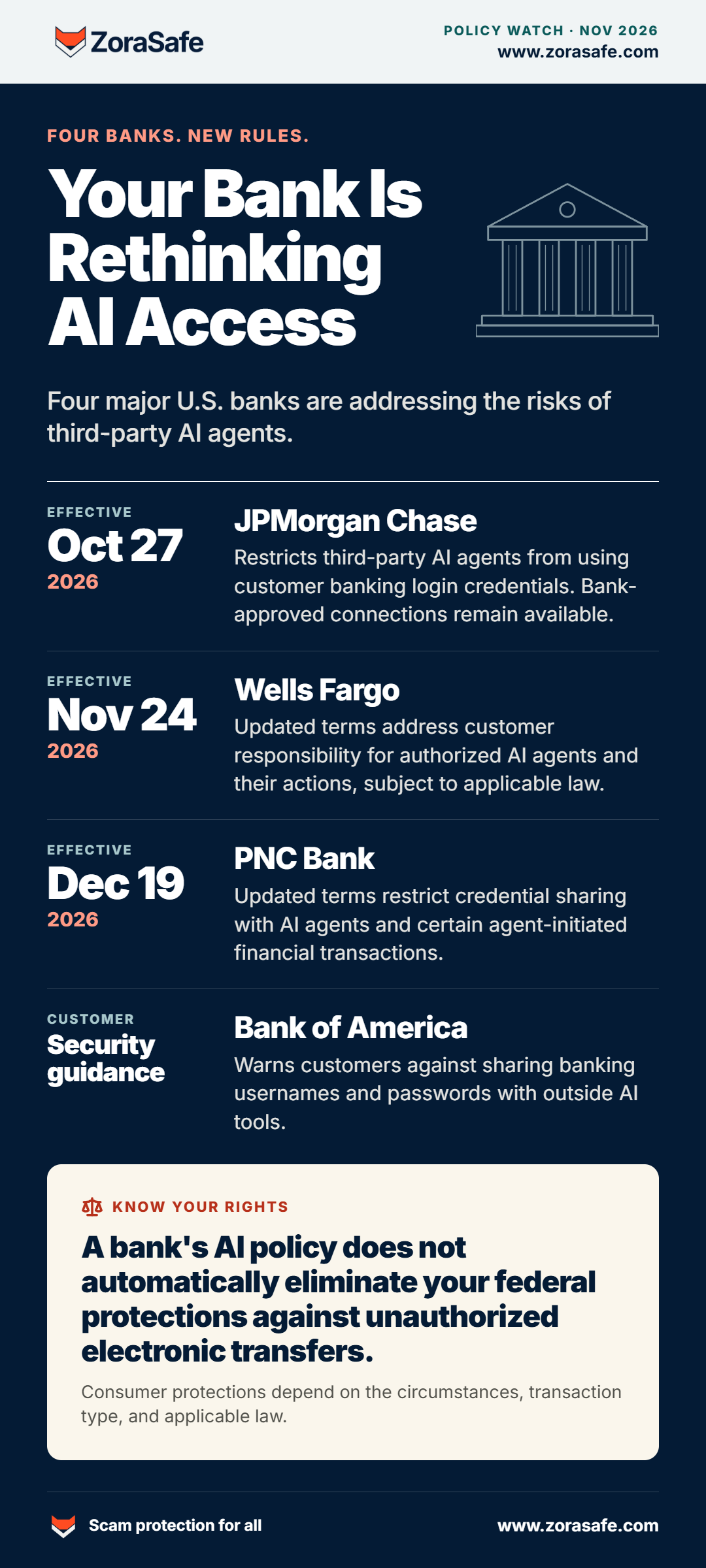
JPMorgan Chase
October 27, 2026. Chase bars outside agents, automated tools and aggregators from using your login. You can authorize account-data sharing through a bank-approved connection, called an API. Chase directs customers who already shared their login to change it. Chase Digital Services Agreement
Wells Fargo
November 24, 2026. The agreement covers agents Wells Fargo may permit. If you authorize an agent, the bank may treat its instructions as yours, subject to applicable law. Monitor its activity. When you withdraw permission, keep proof and notify the bank as directed in section 17(d). Wells Fargo Online Access Agreement, sections 15 and 17
PNC Bank
December 19, 2026. PNC requires permitted connections and prohibits giving outside agents passwords or one-time codes. Agents cannot initiate payments unless PNC expressly permits this for the service. Shared browser sessions, automated clicks and screen scraping cannot bypass those limits. PNC Digital Services Agreement
Bank of America
Consumer security guidance. Enter your login and security codes only with the bank. Bank of America warns that sharing credentials can make you responsible for the resulting activity. Check what an outside service can do and what account information it may keep. Bank of America’s AI security advisory
 Preview
The bank policy guide
Keep the four banks’ rules and effective dates together for reference.
Will your bank reimburse you?
You asked an agent to pay one bill. It paid twice. The bank may regard both instructions as authorized. Report the error promptly. Show the original instruction, the two payments and any notice ending access. Ask the bank to investigate.
You connected a budgeting service. A thief stole your credentials from the provider. A transfer from a covered consumer account can be unauthorized under Regulation E if someone initiated it without actual authority and you received no benefit. Using an outside service does not automatically waive that protection. Tell the bank who had permission to do what, and ask for the investigation result in writing. CFPB electronic fund transfer FAQs
Regulation E generally covers qualifying electronic transfers, including debit-card and ACH payments, from personal, family or household accounts. Different rules govern business accounts, credit-card charges and certain wires. Call as soon as you notice a problem. The usual deadline for reporting a statement error is 60 days after the bank sends the statement. A shorter period can affect liability for a lost or stolen access device. Liability limits and error resolution
Which AI banking tools are safer?
Start with the task. The same assistant can explain a term in one conversation and ask to control your browser in another.
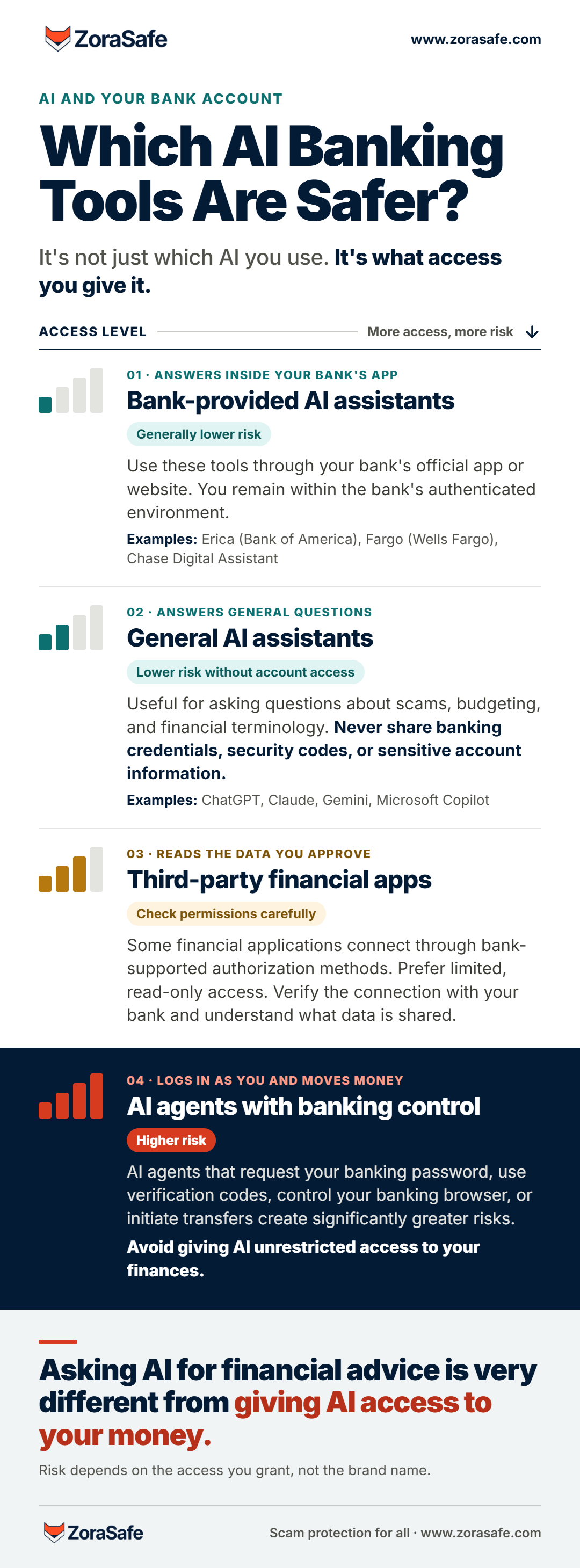
- Learning about money. Ask ChatGPT, Claude, Gemini or Microsoft Copilot to explain an overdraft fee using fictional numbers. Keep the account disconnected. Leave out passwords, codes and unredacted statements, which can reveal addresses and payees.
- Using your bank’s assistant. Open the genuine app to reach Erica, Fargo in the Wells Fargo smartphone app or Chase Digital Assistant. This generally avoids giving a separate AI provider your password. Check the amount and recipient before approving a payment.
- Connecting a financial app. A spending tracker may need read-only access to one account. Review permissions on the bank’s own screen. A supported connection does not establish that the bank endorses the app or has audited its data storage.
- Handing over control. A password, one-time code, signed-in browser or automatic transfer permission can let an agent act as you. Decline that access for a task as simple as summarizing spending.
 Preview
Four ways AI connects
Compare the permissions behind a chat, an in-app assistant, a data connection and a payment agent.
Six questions before you connect
- Does my bank support this connection? Check in the bank app or call the number on your card.
- Where am I entering my password? Enter bank credentials only in the genuine bank app or website.
- What can the tool see or do? Look for named accounts and permission to add payees or send money.
- How long does access last? Find the expiry date and the disconnect control.
- Who gets my data? Check who receives copies, how long they keep them and how to request deletion.
- Who handles a mistake or breach? Save the bank’s and provider’s contact details somewhere you can reach independently.
If you already gave a tool access
See a payment you didn’t authorize? Call your bank now using the number on your card or in its genuine app. You can complete the other checks afterward.
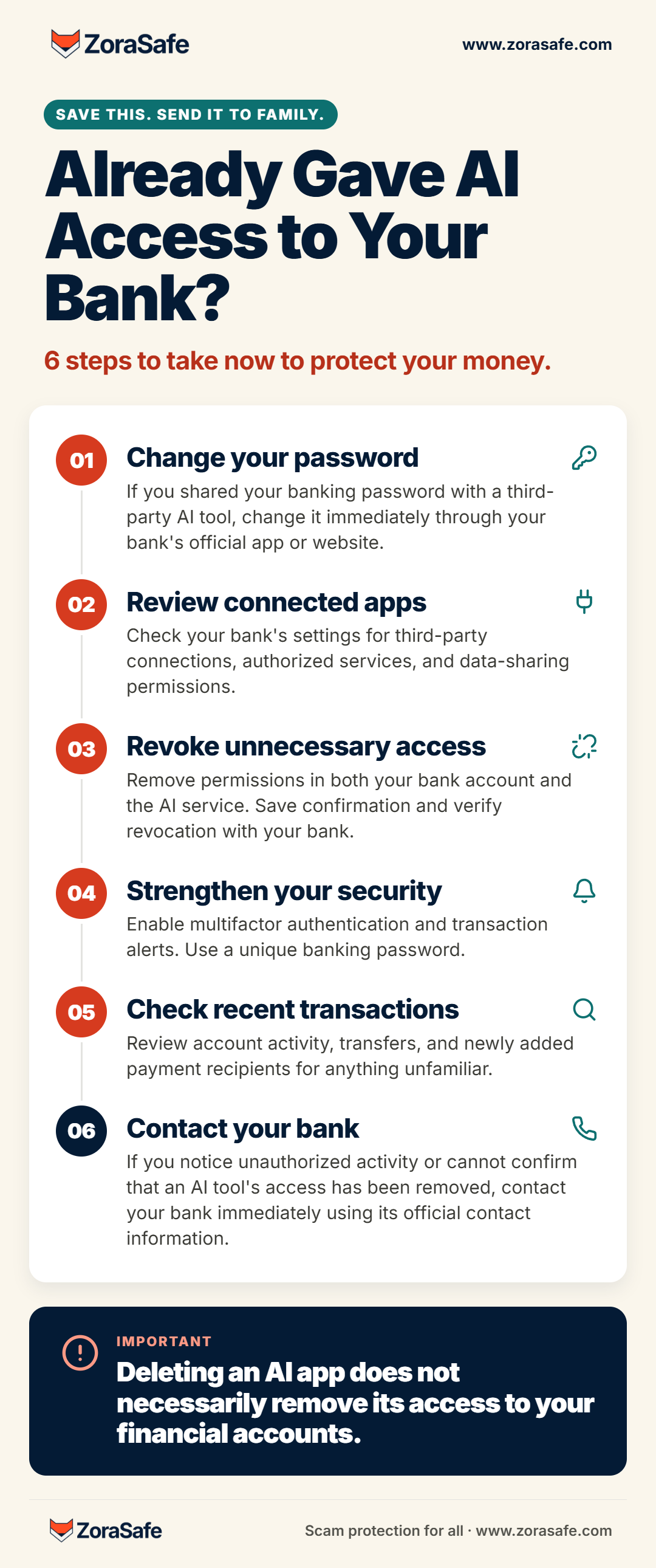
- Report the transfer. Give the bank the date and amount. Ask how to track the investigation.
- Change any password you shared directly with the tool. Choose a unique one through the bank.
- Review connected apps in the bank’s security or data-sharing settings.
- Revoke unnecessary permissions at the bank and the service. Confirm with the bank that access has ended.
- Save proof of revocation. Keep a dated screenshot, confirmation email and case number.
- Enable transaction alerts for transfers and new payees where available.
- Turn on multifactor authentication and keep verification codes private.
- Check recent and pending activity for unfamiliar payments, recipients or changes to contact information.
 Preview
The six-step recovery checklist
Save or share this six-step summary of the eight actions above.
Helping a parent or loved one
Read the permission screen together. Ask an aging parent what they want help with and let them choose what to share. Someone who relies on voice assistance can ask the bank to demonstrate its accessible options.
For ongoing help, ask about separate logins, view-only access, authorized signers, shared alerts or a power of attorney the bank recognizes. A trusted contact gives the bank someone to call with a concern. Naming one generally confers no authority to transfer money. Example of a bank’s trusted-contact program
Frequently asked questions
Can I safely use ChatGPT with my bank?
For education, use invented examples and leave your account disconnected. Check your bank’s rules before enabling any feature that can sign in or take action.
Which AI banking assistants are safer?
Start inside the genuine bank app. For an outside tool, choose bank-supported access limited to your task and check its privacy terms.
Can my bank refuse reimbursement if an AI tool is hacked?
The bank must consider the facts and applicable law. Report a thief’s transfer immediately, even if you originally authorized the service to read your account.
How do I check whether an AI app has access to my bank?
Review connected apps and data sharing in the bank’s settings. A tool using your password directly may be absent from that list.
What should I do if I already shared my banking password?
Change it through the bank, ask it to end other sessions, revoke the connection on both sides and report unfamiliar activity.
Sources
Read the bank documents from Chase, Wells Fargo, PNC and Bank of America. For federal protections, see the CFPB electronic fund transfer FAQs.
Share a safer banking habit
Keep banking credentials private, keep financial decisions in your hands and verify outside connections with the bank. Share the checklist with a parent, partner or caregiver. The next time an app asks to connect, read the permissions together before either of you taps Allow.
If a message claims the bank needs you to reconnect, check the signs of a fake bank text or learn how fake bank support works. Explore ZoraSafe’s scam awareness resources, family protection guides and how Ask Zora helps you review a suspicious request.